For you
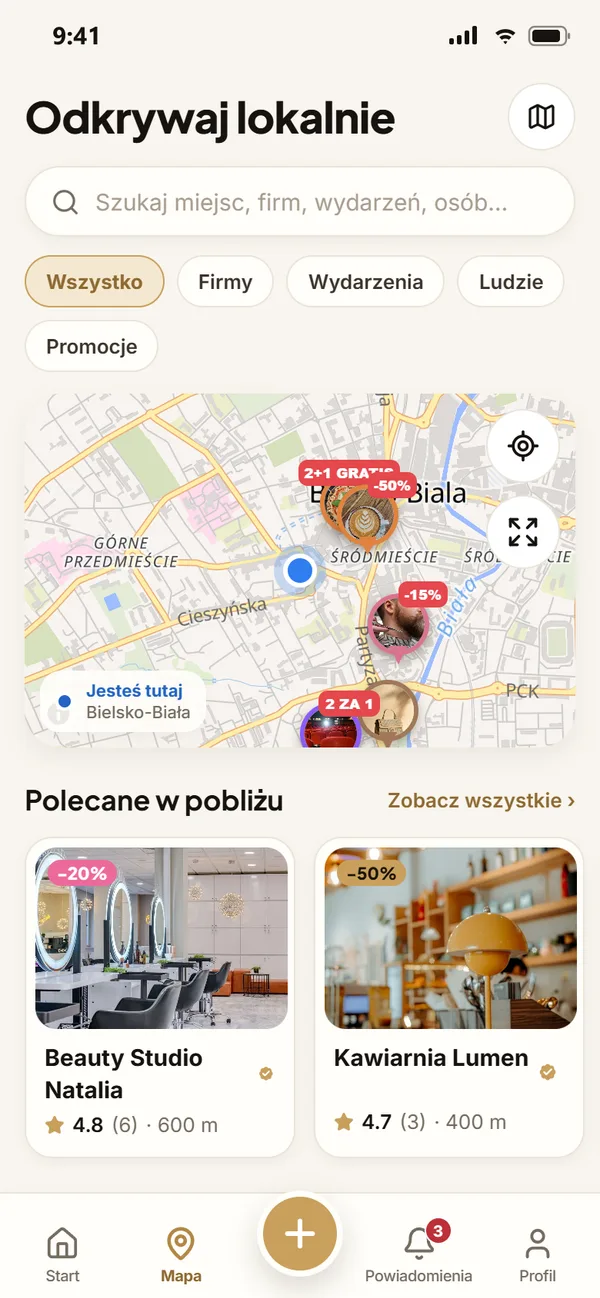
Your local area in one app
Find the best restaurants, beauty salons, mechanics, events, and much more. Follow your favorite spots, take advantage of special offers, and stay up to date with what’s happening near you.
Businesses
Local business profiles including price lists, opening hours, photos, and reviews.
Promotions and coupons
Local discounts. Claim a coupon with a single click and show the QR code at checkout.
Reels
Short videos from local businesses and people—with a button to send a message or book an appointment instantly.
Events
Concerts, open days, and workshops. Check out "Today," "This weekend," and "Nearby."
Reviews
Honest ratings and business responses. One review per person; suspicious entries are sent for moderation.
Messages
Message businesses directly – no need to search for phone numbers or email addresses.
See what’s happening 5, 10, or 25 km from you
The "Nearby" mode combines a map with a feed, showcasing businesses, special offers, short-form videos (Reels), and events in your chosen area. Simply select a radius and a category—we’ll display everything else on the map.
1 km · 5 km · 10 km · 25 km · 30 km
Safe and fair
Verified businesses
A person checks the documents for verification — the badge is not awarded automatically.
Honest reviews
One review per person; detection of duplicate or mass-submitted ratings; moderation of suspicious entries.
Secure messaging
Blocking, reporting, and privacy settings – you decide who can message you.
Clearly labeled advertisements
All paid content is marked with a "Promoted" label and the name of the company that paid for it.
Questions from users
Is the app free to use?
NexaLocal is free for both customers and businesses, with no subscription fees. Profiles, posts, photos, Reels, services, and bookings are all available without a paid plan. A 5% commission on the final value of a completed booking is charged to the business; no commission is charged for cancelled bookings. Promotion and advertising are optional.
How do reviews work?
Any logged-in user can submit a review (1–5 stars, text, and photos) – one per business, with the option to edit it later. The business may post a public response. Suspicious reviews (e.g., those added in bulk or duplicated) are sent for moderation. We do not label reviews as "verified purchase," as we do not verify such claims.
Can I delete my profile?
Yes, at any time: Settings → Account → Delete account. Your personal data is removed immediately, and your posts, comments, and reviews will no longer be visible. A business profile can be deleted by its owner via Business Center → Business Profile.
How do coupons work?
A business can offer a promotion with a set number of coupons. You can claim a coupon with a single click; it will then appear in your "My Coupons" section, complete with a QR code. Simply show the code at checkout—the business will scan it using their app, and the coupon will be redeemed. Each coupon can be used only once.
Do I have to share my exact location?
No. Selecting your city is sufficient. If you choose to use your phone's location, we store it only as an approximation (within a range of about 1 km)—solely for the purpose of showing you what is nearby. We never disclose your location to others.
How can I report inappropriate content?
A "Report" option is available next to every post, comment, review, profile, and message. Reports are sent to our moderators, and we notify both the person who submitted the report and the author of the content regarding our decision (including the reasoning).
How can I contact a business?
On a business’s profile, you will find "Message," "Call," and "Directions" buttons. Messages go directly to the business’s inbox within the app, where the owner or their team can respond.
Is the app available for mobile phones?
Yes. You can use NexaLocal via a web browser (including on your phone) or through the Android app, which is available for download from the website. Versions for App Store and Google Play will be available soon.
How do group purchases work?
The organizer defines a collective requirement, specifying the unit, target quantity, and deadline. Neighbors join the initiative, and local businesses submit offers with a gross price per unit. Once the required quantity is reached, the organizer selects an offer, and each participant confirms their interest individually. Neither joining the initiative nor selecting an offer involves any payment or creates an automatic booking. Terms of service and payment are arranged directly with the business.
How do I post a skill I offer?
Go to "Local Skills" → "My Skills" and add a description, category (optional), starting price, and contact availability. You can post up to six listings. A public profile with a specified location is required. The price and availability serve as your initial offer; specific details can be settled via private messages. If your profile is set to private, you have blocked a user, or your content has been suspended by a moderator, it will no longer be visible in the directory.
Does the route planner show actual travel time?
The planner stores up to eight stops on your device and sorts them by straight-line distance, with an optional return leg. It does not account for traffic congestion, appointment times, or traffic flow directions. Once you confirm, the locations are exported to Google Maps, where you can check the route and travel time. For longer routes, you can open the plan in several parts to ensure all stops are retained in your mobile browser.
The app is always free for users.